







Your team can run production. You focus on patients.
The most common hesitation about bringing aligner production in-house isn't the printer — it's "who's going to run this?" The honest answer: not necessarily you. LuxCreo's workflow is built so trained staff can own day-to-day production while the doctor stays in the chair.
Your staff can run this. Easily.
LuxCreo's workflow runs on one-click automation, from LuxDesign import through LuxFlow print preparation, specifically so day-to-day production doesn't need to sit on the doctor's desk. Hands-on training at installation gets a staff member operating the system, and most practices start printing on day one. The doctor's job stays clinical: scan, plan, approve. Everything after that — queueing, printing, post-processing, delivery — is built to be delegated. See it in practice: watch a LuxCreo practice's own staff running production.
What stays with the doctor, what moves to staff
Clinical judgment
- Intraoral scan and diagnosis
- Treatment plan design decisions
- Final design approval before printing
- Patient consultation and fit checks
Production operations
- Scan import and LuxDesign automated setup
- Print preparation in LuxFlow (one-click)
- Running the iLux Pro print queue
- Post-processing: wash, cure, quality check
- Aligner packaging and delivery to patient
From install to independent production
Hands-on training, on the actual system
LuxCreo provides hands-on training as part of installation, walking staff through the real workflow on the equipment they'll be using daily, not a generic manual.
Start simple, build muscle memory
Staff begin with straightforward cases — mild crowding or spacing — before moving to more complex movements as confidence builds, rather than being thrown into the hardest cases first.
LuxAcademy, webinars, and workshops
Continued education is available through LuxAcademy, live webinars, and in-person workshops, so the team's skills keep pace as the practice takes on more complex cases or higher volume.
A support team that actually responds
LuxCreo's global support team responds to the large majority of tickets within about an hour, so a stuck print or a design question doesn't stall production for a full day.
What delegated production actually buys the practice
More chair time, not more screen time
Production doesn't stop when the doctor is booked solid
A new skill and role for existing staff, not a new hire
Volume grows without the doctor becoming the bottleneck
Training questions, answered directly
Can dental staff run direct-print aligner production instead of the doctor?
Yes. LuxCreo's workflow is built around one-click automation, from LuxDesign import through LuxFlow print preparation, specifically so a trained staff member, not the doctor, can operate day-to-day production once trained. The doctor's role stays clinical: scanning, treatment planning, and approving the design, while staff manage the print queue, post-processing, and delivery.
How long does it take staff to learn the direct-print aligner workflow?
LuxCreo provides hands-on training at installation, and most practices begin printing on day one. Staff typically build full confidence over the following weeks by starting with simpler cases before progressing to more complex movements, rather than requiring months of training before going live.
What ongoing training and support does LuxCreo provide after installation?
Beyond initial training, LuxCreo offers LuxAcademy education, live webinars, and in-person workshops for continued learning, plus a global support team that responds to the large majority of support tickets within about an hour.
What parts of the workflow does staff actually need to learn?
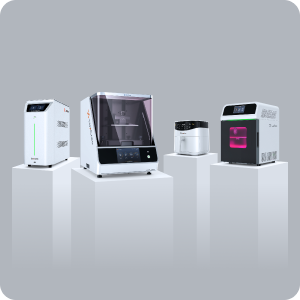
Staff training covers scan import, automated design review in LuxDesign, print preparation in LuxFlow, operating the iLux Pro printer, and post-processing with iLuxWash and iLuxCure Pro. Because design and print-prep are largely one-click automated, most of the learning curve is procedural rather than technical.
"I feel like I am in control of the process, as opposed to just hoping that a lab tech gets it right."
See the training plan for your team
A LuxCreo specialist can walk through exactly what onboarding looks like for your staff size and current experience level with digital workflows.
Still deciding?
Training scope, support response figures, and onboarding timelines reflect information published by LuxCreo at the time of writing and are subject to change. Confirm current training program details directly with LuxCreo.